Sunday, 17 December 2017

Java and liferay Spring MVC with annotation

Q-What is spring mvc?
ans-Spring  MVC is design pattern which provide seperation of presentation layer and business layer
It provides solution to layer an application by separating three concerns business, presentation and control flow. Model contains business logic, controller takes care of the interaction between view and model. Controller gets input from view and coverts it in preferable format for the model and passes to it. Then gets the response and forwards to view. View contains the presentation part of the application.

    • The model is contract between controller and view, Model represents data of the application , it contain service layer and data acccess alyer also it has setter and getter method basically model is simple java class which generates dao and dto classes
    • The view is  responsible for particular jsp page and html page what you displaying on UI ...visualization of your model.
    • The controller manages complete lifecycle of application, it is responsible for recieving the request from user and calling backend servicess and makes calls into business objects.


DispatcherServlet

Purpose of dispatcher is recieve the request & map those request to the correct resource such as controller, model & views

DispatcherServlet is the class that manage the entire request handling process.

Spring MVC Advantage:-
1-reusing component
2-Modifying in one layer will not effect   other layer.


Spring MVC 3.0.0 Execution Flow:-

1-The DispatcherServlet first receives the request.
2-The DispatcherServlet consults the HandlerMapping and invokes the Controller associated with the request.
3-The Controller process the request by calling the appropriate service methods and returns a ModeAndView object to the DispatcherServlet. The ModeAndView object contains the model data and the view name.
4-The DispatcherServlet sends the view name to a ViewResolver to find the actual View to invoke.
5-Now the DispatcherServlet will pass the model object to the View to render the result.
6-The View with the help of the model data will render the result back to the user.
    
In Spring MVC we have presentation layer,controller layer,service layer and model layer.
Suppose from presentation layer we have return suppose login.jsp, in
When we click on submit button than one url will be found with that url request will be forward to the server,
-on server in web.xml you have configured dispatcherServlet  here dispatcherServlet is the frontController for spring mvc.

DispatcherServlet test client request, it will take url pattern, Using URL Pattern it will contact one component of spring mvc called handlerMapping.

handlerMapping is responsible to take URL, based on that url it will identify which controller class of your application, which method is responsible to process url pattern, so that controller class information and method releted information will send back to the dispatcher.

Finally controller class that particular method will be called, in that method if you use service class that object will be created, it will contact database model layer.

From controller class you returning some string that is viewlogical name that will come to dispatcherServlet.

again dispatcherServlet will give view logical name to the viewResolver, viewResolver is responsible to take string , it will add prefix and suffice

view will be render to the client, view will be return to dispatcherServlet and it will display to client


Liferay Spring MVC Annotation:
1-@RequestMapping("VIEW")
2-@RenderMapping(params = "action=saveRecord")
3-@ResourceMapping(value = "getStateCountry")

interview question of Exception Handling in Java

Q- What is exception??
Ans-Exception is abnormal condition which occured at runtime
abnormal means- it will not maintain normal flow.
We use exception to print a user friendly warning message to suer......
we can handle exception:-
1-try
2-catch
3-finally
4-throw
5-throws

Q- Why we use exception handling??
Ans-Here abnormal termination will happen..
Suppose 1000 line code is there inside method...
From 1000 line of code First 900 line code executed successfully and
900 to 905 there 5 line given some problem, if some problem occure in you code,
Than control will transfer to jvm, JVM  will analyze the problem, and it will create some exception related object, it will throw that object in your program, if you are not handling object
what will happen JVM will propogate that object to default exception handler
default excption handler will print error message and you program will terminated.
So because of 5 line, I dont want terminate entire program bcoz of 5 line i can use try and catch block


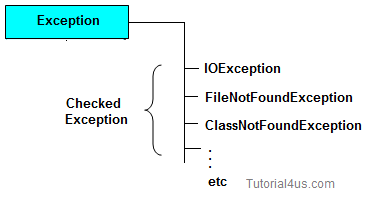
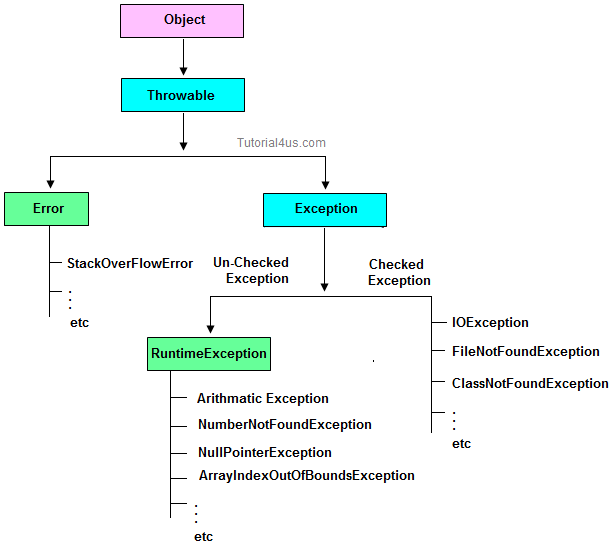
Hierarchy of Exception classes

exception handling in java

Type of Exception

  • Checked Exception
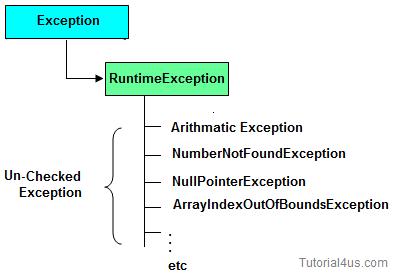
  • Un-Checked Exception

Checked Exception

Checked Exception-"if you code inside the method or constructor throwing some exception and if that exception is checked by compiler, compiler is forcing you to report about the exception by writting by try and catch block or by using throws keyword is called checked exception".
 are the exception which checked at compile-time. These exception are directly sub-class of java.lang.Exception class.
Only for remember: Checked means checked by compiler so checked exception are checked at compile-time.
checked exception

Un-Checked Exception

Un-Checked Exception-means this is aslo called runtime Exception, if some code inside the method throwing exception and compiler is not telling anything wheather exception you want to report or dont report, compiler is not informing anything is called unchecked exception.
 are the exception both identifies or raised at run time. These exception are directly sub-class of java.lang.RuntimeException class.

Note: In real time application mostly we can handle un-checked exception.
Only for remember: Un-checked means not checked by compiler so un-checked exception are checked at run-time not compile time.
unchecked exception


Difference between checked Exception and un-checked Exception

Checked ExceptionUn-Checked Exception
1checked Exception are checked at compile timeun-checked Exception are checked at run time
3e.g.
FileNotFoundException, NumberNotFoundException etc.
e.g.
ArithmeticException, NullPointerException, ArrayIndexOutOfBoundsException etc.


Use Five keywords for Handling the Exception

  • try
  • catch
  • finally
  • throws
  • throw
Syntax for handling the exception

Syntax

try
{
  // statements causes problem at run time 
}
catch(type of exception-1 object-1)
{
  // statements provides user friendly error message 
}
catch(type of exception-2 object-2)
{
  // statements provides user friendly error message
}
finally
{
  // statements which will execute compulsory 
}

Example without Exception Handling

Syntax

class ExceptionDemo 
{
public static void main(String[] args) 
{
int a=10, ans=0;
ans=a/0;
System.out.println("Denominator not be zero");  
}
}
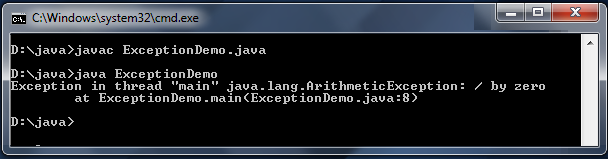
Abnormally terminate program and give a message like below, this error message is not understandable by user so we convert this error message into user friendly error message, like "denominator not be zero".
exception

Example of Exception Handling

Example

class ExceptionDemo 
{
public static void main(String[] args) 
{
int a=10, ans=0;
try
{
ans=a/0;
}
catch (Exception e)
{
System.out.println("Denominator not be zero");
} 
}
}

Custom Exception in Java

If any exception is design by the user known as user defined or Custom Exception. Custom Exception is created by user.

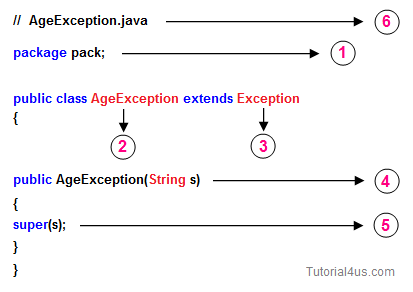
Rules to design user defined Exception

  1. Create a package with valid user defined name.
  2. Create any user defined class.
  3. Make that user defined class as derived class of Exception or RuntimeException class.
  4. Declare parametrized constructor with string variable.
  5. call super class constructor by passing string variable within the derived class constructor.
  6. Save the program with public class name.java
custom exception

Example

// save by AgeException.java
package nage;

public class AgeException extends Exception
{
public AgeException(String s) 
{
super(s);
}
}

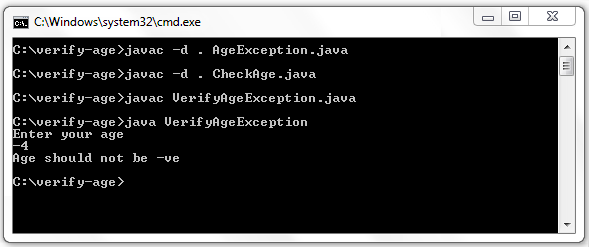
Compile: javac -d . AgeException.java

Example

// save by CheckAge.java
package nage;

public class CheckAge
{
public void verify(int age)throws AgeException
{
if (age>0)
{
System.err.print("valid age");
}
else
{
AgeException ae=new AgeException("Invalid age");
throw(ae);
}
}
}

Compile: javac -d . CheckAge.java

Example

// save by VerifyAgeException

import nage.AgeException;
import nage.CheckAge;
import java.util.*;

public class VerifyAgeException
{
public static void main(String args[])
{
int a;
System.out.println("Enter your age");
Scanner s=new Scanner(System.in);
a=s.nextInt();
try
{
CheckAge ca=new CheckAge();
ca.verify(a);
}
catch(AgeException ae)
{
System.err.println("Age should not be -ve");
}
catch(Exception e)
{
System.err.println(e);
}
}
}

Compile: javac VerifyAgeException.java

custom exception


finally Block in Exception Handling

Inside finallyblock we write the block of statements which will relinquish (released or close or terminate) the resource (file or database) where data store permanently.

finally block important points

  • Finally block will execute compulsory
  • Writing finally block is optional.
  • You can write finally block for the entire java program
  • In some of the circumstances one can also write try and catch block in finally block.

Example

class ExceptionDemo 
{
public static void main(String[] args) 
{
int a=10, ans=0;
try
{
ans=a/0;
}
catch (Exception e)
{
System.out.println("Denominator not be zero");
} 
finally
{
System.out.println("I am from finally block");
}
}
}

Output

Denominator not be zero
I am from finally block

Difference Between Throw and Throws Keyword

throw

throw is a keyword in java language which is used to throw any user defined exception to the same signature of method in which the exception is raised.
Note: throw keyword always should exist within method body.
whenever method body contain throw keyword than the call method should be followed by throws keyword.
throw exception

Syntax

class className
{
returntype method(...) throws Exception_class
{
throw(Exception obj)
}
}

throws

throws is a keyword in java language which is used to throw the exception which is raised in the called method to it's calling method throws keyword always followed by method signature.

Example

returnType methodName(parameter)throws Exception_class....
{
.....
}

Sunday, 26 November 2017

Working with Dynamic Query In Liferay

Introduction of Dynamic query:-

Liferay provides several ways by which we can retrieve data from database. One of them is dynamic query. You can easily fire complex query using dynamic query and it will reduce overhead of creating custom finder methods


How to build Dynamic Query:


DynamicQuery dynamicQuery= DynamicQueryFactoryUtil.forClass(Entity_Name.class, PortalClassLoaderUtil.getClassLoader());
OR
DynamicQuery dynamicQuery = DynamicQueryFactoryUtil.forClass(Entity_Name.class, PortletClassLoaderUtil.getClassLoader());


Note 1: If you working with dynamic query inside your custom portlet and trying to access liferay core entity (i.e, database) then use Portal Class Loader.

 Example like :
Dealing with Liferay's built in entities like Users, Organizations, Assets, AssetCategories 
As DynamicQuery API looks for current classloader, for access, but as you are dealing with Portal level
class [User.class], you have to specify portalClassLoader as below.

 ClassLoader portalClassLoader = PortalClassLoaderUtil.getClassLoader();  
 DynamicQuery query =DynamicQueryFactoryUtil.forClass(User.class, portalClassLoader);  

-
Note 2: Dealing with custom entity within portlet.

DynamicQuery dynamicQuery=DynamicQueryFactoryUtil.forClass(Application.class);

example1:-
1.SELECT * FROM User_ WHERE lastName='Bloggs'
Dynamic Query:
DynamicQuer  dynamicQuery  = DynamicQueryFactoryUtil.forClass(User.class, PortalClassLoaderUtil.getClassLoader());
dynamicQuery.add(PropertyFactoryUtil.forName("lastName").eq("Bloggs"));
List<User> userList = UserLocalServiceUtil.dynamicQuery(dynamicQuery);
Example2:-
DynamicQuery dynamicQuery = DynamicQueryFactoryUtil.forClass(MyCustomTable.class);
dynamicQuery.add(PropertyFactoryUtil.forName("status").eq("Pending")
dynamicQuery.add(PropertyFactoryUtil.forName("userId").eq(10122);

Above query will search in table MycustomTable for records which has status as

Pending and userId as 10122. If you want to sort your records in particular order that also you can do.  Example3:- 2. SELECT * FROM User_ WHERE lastName like 'ord%' Dynamic Query: DynamicQuery dynamicQuery = DynamicQueryFactoryUtil.forClass(User.class,
PortalClassLoaderUtil.getClassLoader()); dynamicQuery.add(PropertyFactoryUtil.forName("lastName").like("ord%")); List<User> userList = UserLocalServiceUtil.dynamicQuery(dynamicQuery);
About Dynamic Query: I am assuming that you are aware of Liferay Service Builder and
you have basic understanding of persisting data by service builder tool.
Consider that you have developed your portlet and you have persisted
a lot many records in the database. You are a java developer and
you don't have much knowledge on queering database.
Liferay Dynamic Query is the rescue in this case.
Liferay provides API to query the database just like writing java program.
You don't need to bother about low level database query.
One point to remember here that Dynamic Query is only to fetch data. Below are the API we will be working with to write dynamic query. com.liferay.portal.kernel.dao.orm.DynamicQueryFactoryUtil com.liferay.portal.kernel.dao.orm.DynamicQuery com.liferay.portal.kernel.dao.orm.Criterion com.liferay.portal.kernel.dao.orm.RestrictionsFactoryUtil com.liferay.portal.kernel.dao.orm.PropertyFactoryUtil com.liferay.portal.kernel.dao.orm.Projection com.liferay.portal.kernel.dao.orm.ProjectionFactoryUtil com.liferay.portal.kernel.dao.orm.ProjectionList com.liferay.portal.kernel.dao.orm.OrderFactoryUtil

Monday, 18 September 2017

Get value from hidden field - jQuery

How can I get the value using jQuery?

<input type="hidden" value="" id='h_v' class='h_v'>

Use val() instead of text() var hv = $('#h_v').val(); alert(hv);

Wednesday, 6 September 2017

Check Null with ternary operator

At its most basic, the ternary operator, also known as the conditional operator, can be used as an alternative to the Java if/then/else syntax, but it goes beyond that, and can even be used on the right hand side of Java statements.


Example:-

<c:out value="<%=item.getMiddleName()!=null?item.getFirstName()+' '+item.getMiddleName()+' '+item.getLastName():item.getFirstName()+' '+item.getLastName()%>"></c:out>

Thursday, 17 August 2017

Clear form input fields except radio/select menu values?

Clear form input fields except radio/select menu values?


First way  ---


$(':input','#myform').not(':button, :submit, :reset, :hidden').val('').removeAttr('checked').removeAttr('selected');

                          (OR)


$('#FormIDReset').trigger('click');
<button class=" " type="reset" id="FormIDReset">Clear</button>


Wednesday, 4 January 2017

JQuery DataTable Sample Example

<script src="https://code.jquery.com/jquery-1.11.3.min.js"></script>
<script src="https://cdn.datatables.net/1.10.9/js/jquery.dataTables.min.js"></script>
<link rel="stylesheet" href="https://cdn.datatables.net/1.10.9/css/jquery.dataTables.min.css"/>

<div>
<table id="regionTable" class="table table-hover table-striped table-bordered">
 <thead>
     <tr>
          <th>OrganizationId</th>
         <th>Parent OrganizationId</th>
         <th>Type</th>
          <th>Code</th>
         <th>Action</th>
     </tr>
 </thead>
 <tbody>
 
    <tr>
     <td>fhf</td>
     <td>fh</td>
     <td>fhf</td>
     <td>fh</td>
     <td><button class="edit" >Edit File</button>
      <a href="#"> <button class="remove" >Delete File</button></a></td>
   
    </tr>


 </tbody>
</table>
</div>


<script type="text/javascript">
$(document).ready(function() {
    $('#regionTable').DataTable();
} );
</script>